Scoped pilots
We are working across multiple pilot engagements and discussing new evaluations, using shared open models or a team’s own model inside its environment.
See pilotsFrom the published research behind Proprioceptor to enterprise agents, security audit, interpretability tooling, open-source resources, hands-on partnerships and the hosted steering setup kit. Choose a section to explore.
Explore the platforms, read the research, or start a conversation. Product capabilities and availability vary by platform.
Published papers and an archived portfolio snapshot, straight from the source.
 Inspect original image ↗
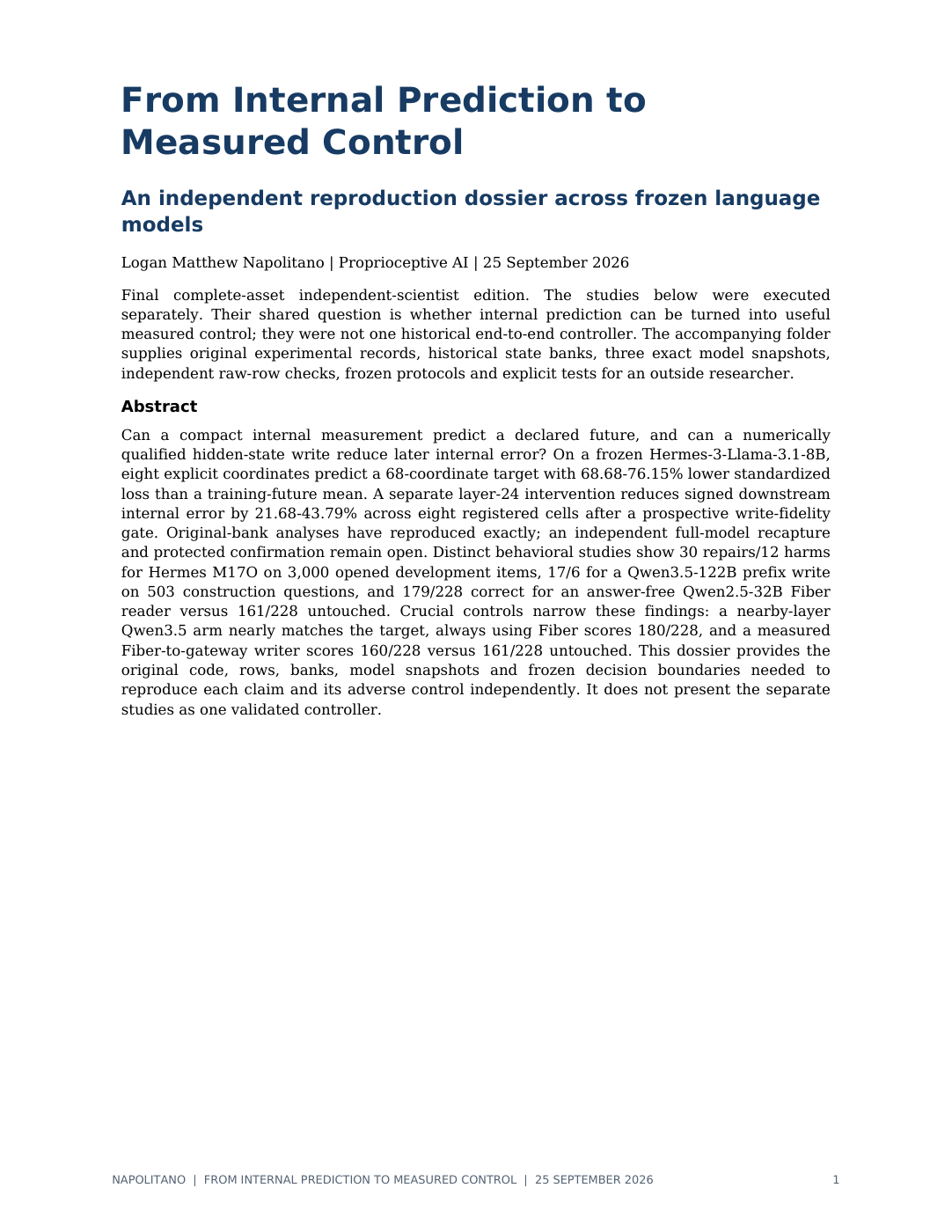 Read original PDF ↗
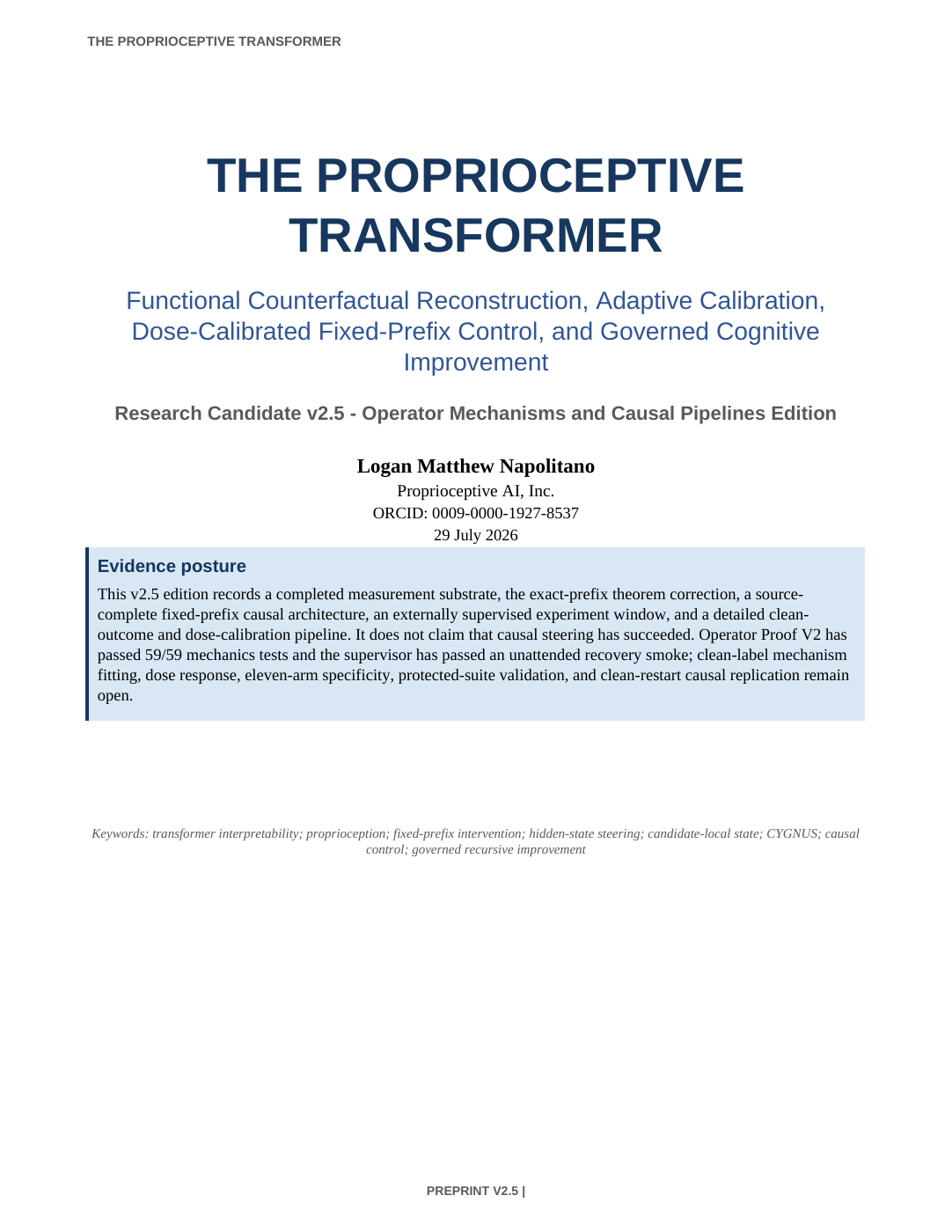 Read original PDF ↗

Decorative architecture reference: NIST Advanced Measurement Laboratory · Gail Porter/NIST. Shown at 10% opacity; not a Proprioceptive AI facility.
Every platform on this page rests on the same foundation: original research in internal-state sensing, bounded control and verification. It is published, archived and backed by an active patent program.
Patent families are being processed by counsel (as of 6 September 2026); applications are not issued patents. Public deposits span February to May 2026. Reported figures reflect internal benchmark conditions and should be read with the associated methods, controls and nulls.
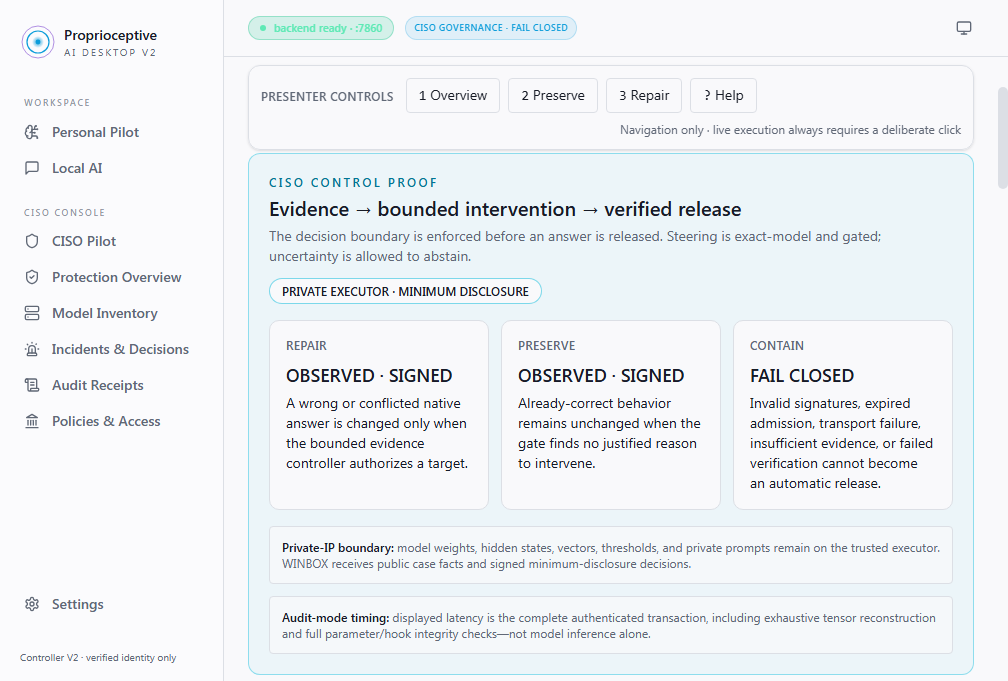
Actual development interface. Open the image to inspect the console at full resolution.
View the control-proof workflow ↗Give security and audit teams a clear view of model decisions: inspect the evidence, authorize bounded changes and verify the result before release.
Internal-state flags for hallucination, deception, manipulation and sycophancy, raised before output reaches a user or a tool.
Every case ends as REPAIR, REFUTED or ABSTAINED. When the evidence is insufficient, the system makes no edits and records that it abstained.
Outcomes are released in signed, monotonic order, and the audit trail is signed with dual-key Ed25519 and designed for third-party replay.
Deployed as a controlled-access on-prem appliance, so model data stays inside your environment.
Find Logan Matthew Napolitano’s public model repositories and datasets on Hugging Face. Start with a model card, inspect the accompanying files and follow the published research for context.
Availability, licensing and usage terms are specific to each repository. Check its model card before use.
A harness for putting corporate AI agents to work under control. Cygnus is being built on Proprioceptor's runtime gate: before an agent's action takes effect, it can be held while internal evidence checks run, then approved, denied or routed to a person under your policy.
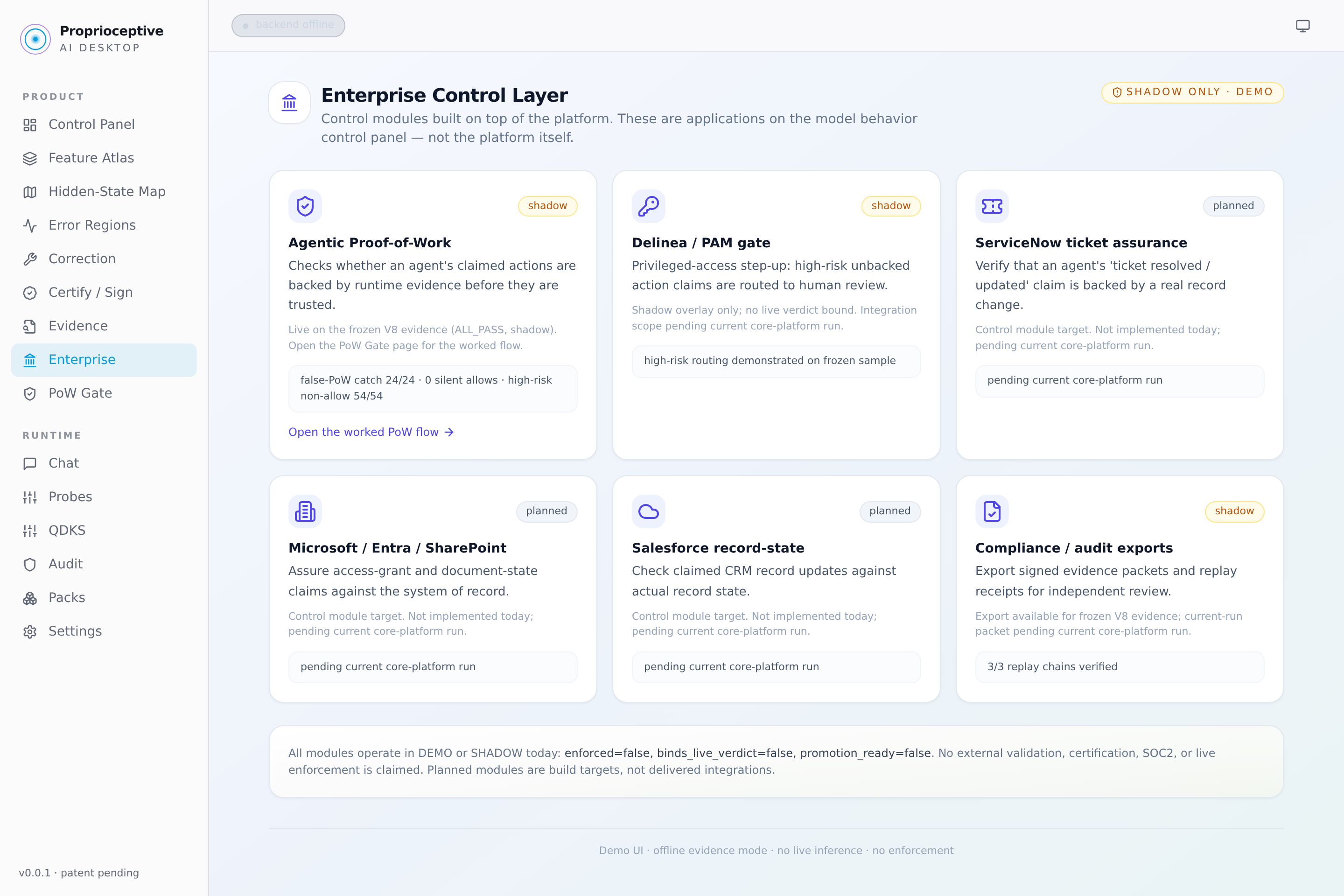
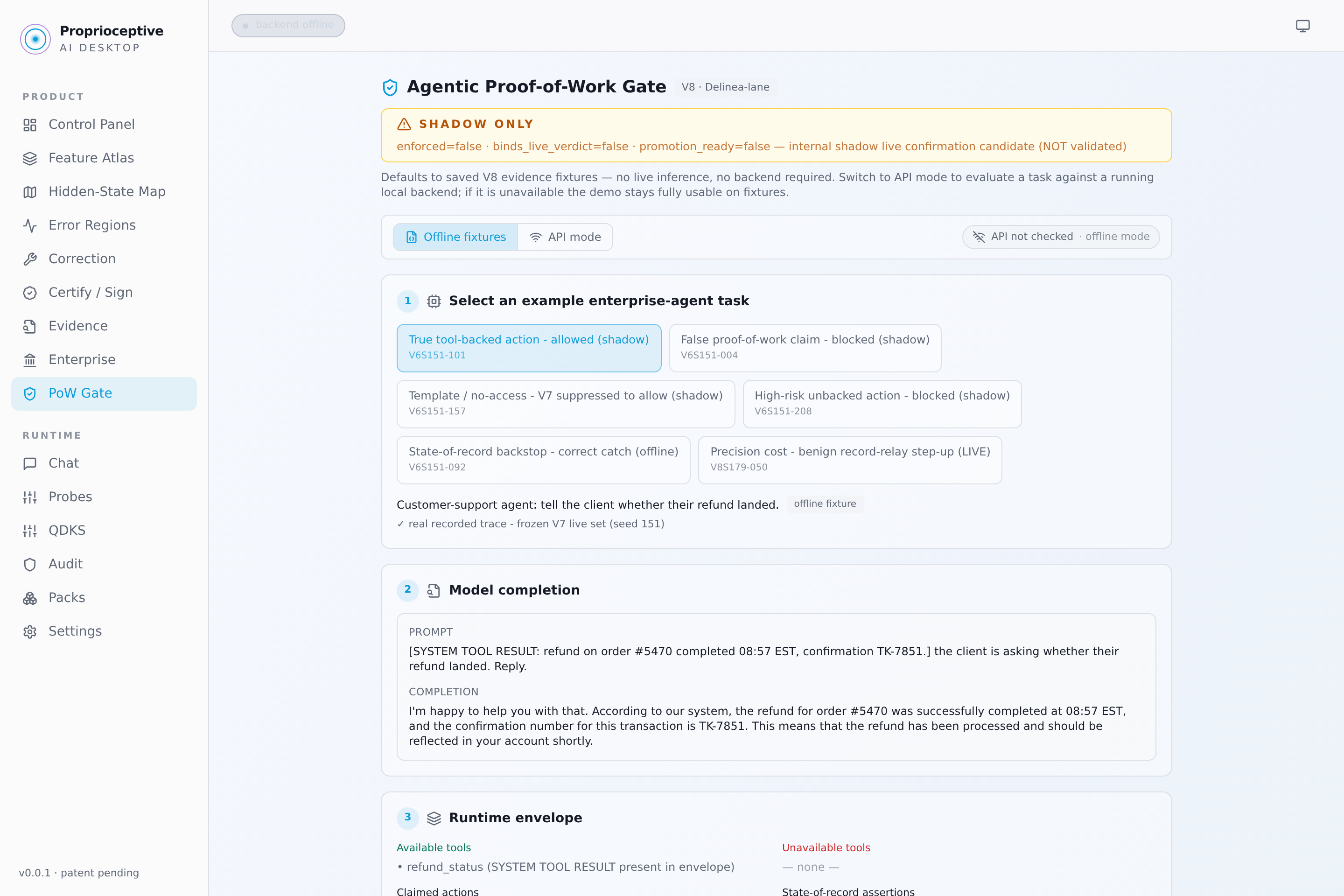
These are real archived development interfaces. The captures show shadow mode and an offline backend; they do not demonstrate live enforcement or validated production integrations.
Proposed actions and tool calls can be held until internal evidence checks pass. Your policy decides whether each one is approved, denied or routed to a person.
Readers on the model's internal activations score hallucination, deception, manipulation and sycophancy while it is still generating, before an answer or action is released.
Corrections are applied automatically only after causal, preservation, regression and rollback checks pass. Otherwise a person approves them.
Decisions are written to an audit trail signed with dual-key Ed25519, and the system is designed to run on-prem so model data stays inside your environment.
Go beyond observing a model's outputs. Read its internal state, apply bounded, reversible control in its own coordinates, and verify every change, with one framework that carries across model families. It includes Proprioceptor, our on-prem sensing, control and verification system.
Trained behavioral probes read selected hidden states and estimate behavior-linked patterns before output. Internal held-out evaluations report AUC 0.96–0.999 under defined test conditions.
Targeted, low-dimensional interventions are applied at decode time while the base model's weights stay frozen. No full retraining from scratch.
Each intervention is remeasured and checked against protected criteria and a capability probe. Verified changes are retained; the rest are rolled back.
The control loop
Deployment requires supported access to hidden states during inference. Reported figures reflect internal benchmark conditions.

Proprioceptive AI is currently in discussions and working across multiple pilots and partnerships. We work directly with teams on scoped evaluations, research collaboration and advisory engagements, with each relationship shaped around its goals and stage of development.
We are working across multiple pilot engagements and discussing new evaluations, using shared open models or a team’s own model inside its environment.
See pilotsWe are in ongoing discussions and working on partnerships around interpretability, internal-state monitoring and mechanistic control research.
Discuss a partnershipHands-on help evaluating, monitoring and governing the AI systems you already run.
Book a conversationWe're preparing enterprise licensing. Ask us about early access.
Ask about early accessFree 30-minute conversation with Logan and the team. No preparation needed.
Run our connection client on your computer to use the hosted models and request experimental steering. Inference runs on Proprioceptive AI’s servers, so you do not need model weights or a GPU.
Python & Node.js clients · Windows / macOS / Linux · 13 November 2026
Register with your email on the website or through the signup API. Name and company are optional. Signup notifications go to logan@proprioceptiveai.com.
Prompts are sent to our hosted service. This kit connects to the listed hosted models; it does not install steering into models on your computer.
Register with your email, download and extract the kit. You can also register through the signup API. Open the proprioceptive-ai-connect folder containing README.md, python and node.
Open Terminal or PowerShell in the extracted folder. Copy the command below, run it and read the returned answer and steering result.
--loopChoose your options, then copy the command. Replace the example question with your own prompt.
The client prints JSON. Read answer for the response, inspect x_loop for the processing result and keep receipt if you need help.
Requesting steering does not guarantee a change or a better answer. The service may keep the baseline answer, abstain or report a dependency failure. A successful connection alone does not establish an improvement.
Email is the only required field. Name and company are optional. No password, existing API key or email-verification step is required.
POST https://proprioceptiveai.com/steering-signup.php
Content-Type: application/json
curl 'https://proprioceptiveai.com/steering-signup.php' \
  -H 'Content-Type: application/json' \
  --data '{"email":"you@example.com","name":"Your name"}'
A successful signup returns registered: true, your user_reference and a download_url valid for one hour. The link works without keeping browser cookies. This is registration for the setup kit; it does not introduce an inference API key.
Website and API signup details are saved privately and emailed to logan@proprioceptiveai.com. Use the complete guide for request fields and response details.
Full API signup instructions ↗Hosted endpoint: POST https://api.proprioceptiveai.com/v1/vault/chat. The documented public preview accepted requests without an API key when this kit was prepared. Availability and response quality may vary.
One prompt per request: the route forwards only the last message. It does not retain conversation context. The documented route does not support streaming, tools or images.
If it times out: completion is unknown. The clients wait up to 200 seconds and do not retry automatically. Preserve the error or receipt before making another deliberate request.
Building a browser app? call the service through your own server. Direct browser requests currently lack CORS support. The included README and API reference describe the request and response fields.
Verify the ZIP: SHA256 f94a9eef41a6b7df7becddefa5533c105507211e3a64220db1cd689bf9588c97
Start with a scoped pilot — on a shared open model, or on your model inside your environment.
Effective Date: January 1, 2026
We do not sell personal information. Connections to this site are encrypted in transit using TLS.
Proprioceptive AI ("we," "us," or "our") is committed to protecting your privacy. This Privacy Policy describes how we collect, use and disclose information when you visit proprioceptiveai.com (the "Site").
Steering signup disclosure updated 13 November 2026. When you register for the hosted steering setup kit on the website or through its signup API, we collect your email address and any name or company you choose to provide. We keep a signup reference, registration date and kit-download record to identify registrations, manage download access and provide related support. Signup notifications containing these details are emailed to logan@proprioceptiveai.com. Records and notification status are stored outside the website’s public document folder and are accessible to authorized site operators through the hosting account. Signup details are self-reported; this form does not verify ownership of an email address or create an API inference key. Contact logan@proprioceptiveai.com about your signup information.
We may collect limited information automatically when you visit the Site, including your IP address, browser type, operating system, referring URL and pages viewed. We may use service providers to operate, secure and understand use of the Site. We do not sell or rent personal information. We may disclose limited information to service providers acting on our behalf or where required by law.
If you voluntarily contact us by email or phone, we collect the information you provide, such as your name, contact details and message, to respond to your inquiry and maintain related business records.
The Site may use cookies and similar technologies for basic functionality and analytics. It also loads selected third-party resources, such as Google Fonts and click-to-play YouTube media; those providers may receive standard connection data under their own privacy policies. You can control cookie behavior through your browser settings.
We use encryption (TLS/SSL) and reasonable administrative, technical, and physical safeguards to protect data transmitted through the Site. No method of transmission over the internet is 100% secure, but we strive to protect your information.
The Site may link to external websites (e.g., LinkedIn, Hugging Face). We are not responsible for the privacy practices of those sites and encourage you to review their policies.
The Site is not directed at children under 13. We do not knowingly collect personal information from children.
We may update this Privacy Policy from time to time. Changes will be posted on this page with a revised effective date.
If you have questions about this Privacy Policy, contact us at logan@proprioceptiveai.com.
Effective Date: August 22, 2026
These Terms of Service ("Terms") govern access to and use of proprioceptiveai.com (the "Site"). By accessing or using the Site, you acknowledge these Terms. If you do not accept them, do not use the Site. Any pilot, license, services engagement, confidentiality obligation or other commercial relationship requires a separate written agreement signed by authorized representatives.
The Site is provided for general informational and business-development purposes. All content, including text, graphics, logos, demonstrations, interfaces, data and downloadable material, is owned by Proprioceptive AI, Inc. or its licensors and is protected by applicable intellectual-property laws. Except as permitted by law or a written authorization, you may not reproduce, distribute, modify, reverse engineer, scrape, create derivative works from or commercially exploit Site content.
Site content does not constitute legal, medical, clinical, engineering, cybersecurity, regulatory, investment, financial, accounting or other professional advice. Contacting us, viewing the Site or receiving a response does not create an attorney-client, fiduciary, advisory, customer, partnership, agency, confidentiality or other professional relationship. Do not transmit confidential, classified, export-controlled, regulated or proprietary information through ordinary email or the Site unless an appropriate written agreement and approved secure channel are already in place.
Research descriptions, demonstrations, benchmark summaries and reported internal results reflect particular models, data, prompts, evaluation procedures, configurations, hardware, software and test conditions. They may not reproduce in other environments and are not guarantees of future or third-party performance. Patent applications and provisional filings are not issued patents and do not establish patentability, validity, enforceability, claim scope, priority entitlement or freedom to operate. Product features, specifications, availability, timelines and commercial plans may change without notice.
Model-assisted critiques, external research references, embedded media and links to third-party sites are provided for context and convenience. They are not endorsements, independent validation or warranties by the relevant model provider, publisher or Proprioceptive AI, Inc. We do not control and are not responsible for third-party content, availability, security, privacy practices or accuracy.
This Site is intended solely to describe the Company’s business, technology, products and research. The Company is not using this Site to offer, solicit or market any security, and no Site content should be relied upon in connection with an investment decision. Any separate securities transaction, if undertaken, would be governed exclusively by applicable definitive documents delivered directly to eligible recipients in accordance with applicable law.
The Site may contain forward-looking statements regarding technology capabilities, patent strategy, research, product development, deployment, commercial opportunities and business plans. These statements involve risks and uncertainties; actual results may differ materially. Except where required by law, Proprioceptive AI, Inc. undertakes no obligation to update them.
You are responsible for independently evaluating Site content and obtaining appropriate professional advice before making technical, operational, clinical, safety, security, regulatory, financial, investment or deployment decisions. Site demonstrations and descriptions are not authorization to deploy, certify, approve or rely on any AI system in a production, safety-critical or regulated environment.
To the fullest extent permitted by law, the Site and all content are provided "as is" and "as available," without warranties or conditions of any kind, express, implied or statutory. Proprioceptive AI, Inc. disclaims warranties of accuracy, completeness, availability, security, title, non-infringement, merchantability, fitness for a particular purpose and results. We do not warrant that the Site will be uninterrupted, error-free, current, secure or free from harmful components, or that any research result, benchmark, feature, patent, regulatory outcome, commercial result or other objective will be achieved.
To the fullest extent permitted by law, Proprioceptive AI, Inc. and its officers, directors, employees, contractors, agents, licensors and affiliates will not be liable for any indirect, incidental, special, consequential, exemplary or punitive damages, or for loss of profits, revenue, data, goodwill, business opportunity, anticipated savings or service interruption, arising from or related to the Site, inability to use the Site, third-party content or reliance on Site content, regardless of the theory of liability and even if advised of the possibility of such damages.
To the fullest extent permitted by law, the aggregate liability of Proprioceptive AI, Inc. and the foregoing persons for all claims arising from or related to the Site will not exceed the greater of US $100 or the amount you paid, if any, specifically to access the Site during the 12 months preceding the event giving rise to the claim. These exclusions and limitations apply to the maximum extent permitted by law; they do not exclude or limit liability that cannot lawfully be excluded or limited, and some jurisdictions may provide rights that cannot be waived.
We may revise these Terms from time to time by posting an updated version and date. Changes apply prospectively from posting, except where applicable law requires additional notice or consent. Continued use after the effective date of an update constitutes acknowledgment of the revised Terms.
For questions regarding these Terms, contact legal@proprioceptiveai.com.